Fixing a faulty laptop DC jack connector
I was recently informed that my old laptop, a HP Pavilion ze4111s, (now being used by my girlfriend) that “it doesn’t charge”, which then changed to “it sometimes does, and other times it doesn’t”.
I decided to investigate and began wiggling the AC adaptor at the back in the DC jack socket, which appeared to become lose.
My next idea was to take the laptop apart to take a closer look at the DC jack to see where the problem lay.
The first thing I did was to find the service and maintenance manual on the manufacturers website. I managed to locate the Service and Maintenance manual for the HP Pavilion 4100 series in PDF form, this document can be used for many other laptops as they are all built in a very similar way.
I began following the instructions for “removing the motherboard”, which requires following the instructions for removing other parts first. This is a long process, and can take some time.
To make sure I knew which screws were for what and where, I took a few empty egg boxes, and labelled them as I put the screws in. This will make it easier to locate the right screws when I reassemble the laptop.
After spending some time to get to the motherboard and safely remove it, low and behold the connector had come away from the motherboard, but was sometimes still touching hence why sometimes it worked and other times it did not.
I also discovered that the housing had cracked, and with a little wiggle the top came off, and I could now see the exact problem.
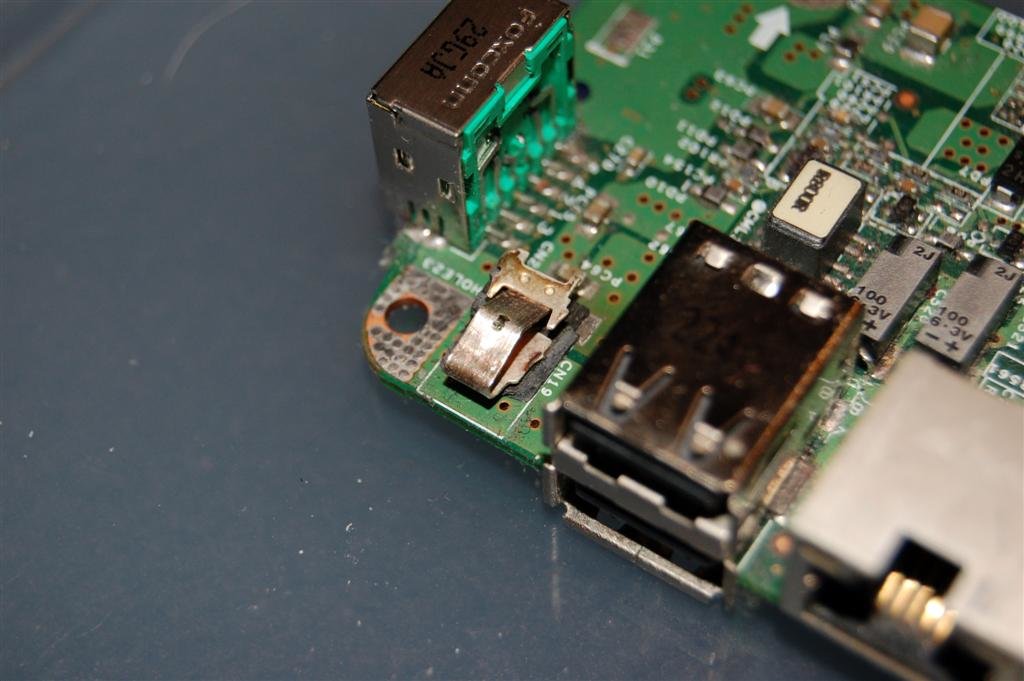
My next step was to work out what to do next with this laptop. This laptop is quite old, and is most definitely outside its warranty period. However I knew what the problem was and had a few ideas on how to fix it.
I decided to contact HP for their suggestions, and while I waited I searched eBay for a supplier of parts for the ze4111s, I located a company who had some parts. I contacted them about getting a replacement motherboard for the laptop, and they suggested that the replacement would be £60. To me that is excessive, probably about 1/3 of the total value of the laptop, it’s not worth it.
I finally got hold of someone at HP, who suggested I contact a service centre, who I found out, charge an absolute fortune! I explained to them that it would not be worth my while and besides I know what the problem is.
I tried resoldering the connector from the housing of the DC jack to the motherboard, but the moment I put the AC adapter into the DC jack the housing would break and force the connection to break.

Upon further examining the motherboard, I discovered that the jack could be safely removed from the motherboard providing I could unsolder it from the underneath where it connects to the motherboard in three places. Not a problem, I’d just require a replacement jack.
I went on to explain this to the HP contact, who provided me with the following details:
I would like to inform you that as per HP policies if the issue is with
power jack then you have to replace the motherboard. However, for your
information I would like to say that the Power Jack on some Notebook
models can be replaced. So, please visit the following Web site to to
know more information about the power jack on the Notebook:http://www.compaqrepair.com
/guide/Compaq_motherboard_ac _power_jacks.htm OR
http://www.laptopjacks.com
/service.php OR
http://www.aacomputerelec.com
/categories.asp?cat=8 NOTE: The URLs above will take you to a non HP Web site. HP does
not control and is not responsible for information outside
of the HP Web site.Once you visit the We site, contact support of the web site and check
for the availability of the power jack for your model.Then take the notebook to nearest Local Service Center and get the power
jack replaced.
This was most helpful, I discovered that clearly it can be done, and there are replacements out there!
I also found this thread, and figured that if this guy could do it, I could do it too.
I found that the sites above were charging a fortune for the replacement jack, so I checked all my usual suppliers for components including Maplin, no such luck.
Then, a brainwave, I could cross reference google with eBay and see if anyone had mentioned a jack for a ze4111s recently. So that’s what I did, and soon discovered the seller “laptop18000“, and their shop “GOOD DEALS IN” based in the USA, but sells DC jacks for laptops for very cheap compared to the previous offers.
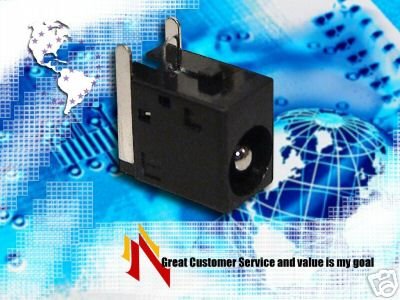
“Sounds good to me!”
From here its simply a case of de-soldering the old connector from the motherboard, soldering the new connector, then putting the laptop back together. Problem solved!
Meanwhile, the laptop remains in pieces…
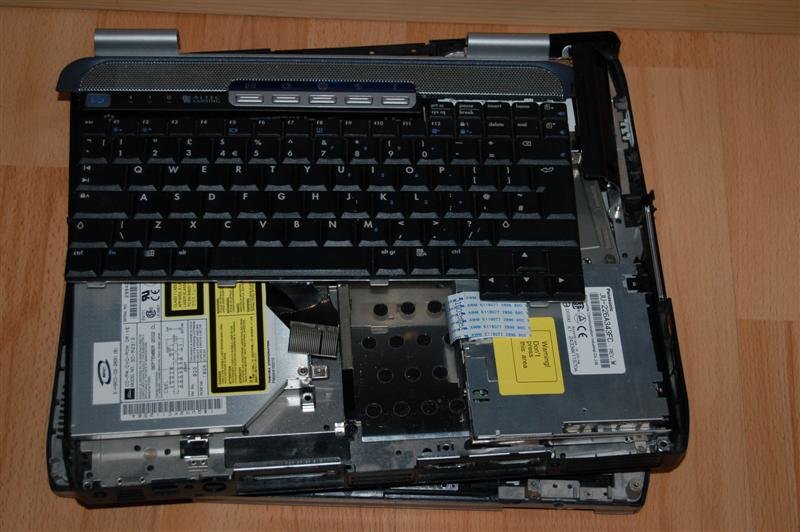
In conclusion, don’t throw your laptop away, don’t pay excessive amounts getting someone autherised by HP to fix it, don’t pay more than you have to. DO IT YOURSELF!
Related posts:
- Parts inside your printer are at the end of their service life Today I had the joy of fixing an Epson Stylus...
Jim Owens said,
January 6, 2008 @ 6:12 am
You inspired me! I have exactly this problem, and, following your leads, I have now dis-assembled my HP zv5340us laptop into about 136 pieces and am down to the power jack on the motherboard. Now, all I have to do is figure out if I can re-solder this jack to the board, or if I should order a new one from the sources you named and solder IT to the motherboard. Then will come the challenge of re-assembly of all these pieces into a working laptop. What an inspiration you were! Thanks, Jim.
hm2k said,
January 6, 2008 @ 12:56 pm
I’m glad somebody else found this useful.
HP Laptop said,
January 8, 2008 @ 12:26 am
How did you remove the motherboard from the base of the laptop? I tried removing it but it seems that it is stuck to the base. Even though I removed all the screws, the part where the parallel port and VGA ports in the back don’t want to come out.
Garry said,
January 22, 2008 @ 8:42 pm
To fully remove the motherboard from the bottom half of the laptop,make sure every single screw is removed.After this is done,towards the rear of the laptop use a small flat end screwdriver to gently lift the metal just above the parallel port then gently slide the motherboard out.It will come out but don’t use excessive force in doing this.All i need to know is my hp pavilion ZE4800 or also known as a ZE4801 laptop just suddenly died on me.The battery and charger are both still working fine but there’s no power at all from my laptop,no lights light-up whatso ever,can any one tell me if my motherboard is bust or could it be something that can be repaired.A new motherboard will cost me around £160,that’s more than i paid for the laptop off Ebay.If any one can help,i sure could do with any information you may have.Thank you
Red Leatherman said,
February 20, 2008 @ 5:53 pm
Thanks for the cross reference links and info
I want to suggest that before taking one of these things apart,
google dissasembly with your laptop info.
saves me a lot of grief
Just did that said,
June 28, 2008 @ 12:21 am
So I took my ZE4800 apart, and the reason the moniter connector and the serial connector dont want to come out of thesocket is because the audio ports need to be freed first. I am still investigating my intermittent power problem. My power connector on the board is fine at first look. but the plugs have been sticking to the connector via alot of heat and melting the plastic. Now i hope to find a new connector and fix the problem.
chris said,
July 22, 2008 @ 10:44 am
Hello Am Chris White and i will like to buy Some Laptops from
your Shop,i will again need to Know the Type of Payment you do Accept and
the Prices Thank You.
Regards,
Chris white
Ze4800 Owner said,
August 28, 2008 @ 8:00 pm
Could someone please guide how do you take the ze4800 motherborad out. I have removed every possible screw. But I not able to remove the Audio jack assembly on the left and the printer/VGA assembly on the rear on the board. If these two are out then I should be able to lift the motherboard up. If I try to slide out the printer/VGA ports then the Audio assembly gets in the way and vice versa. Any clues how to get either out?
Matt K. said,
September 15, 2008 @ 11:16 pm
Do you know where I can find directions for replacing the motherboard on a newer hp laptop (dv2141tx) pavilion???
DLH said,
September 18, 2008 @ 6:47 pm
Hi there .
.
Nice guide, it saved me tons to time
Just fixed a ze4111s… turned out that the powerplug was loose. I sanded the motherbord (and the pcb-lanes) a bit to get the protective coating off, so that the solder would last a bit better.
Katy said,
September 28, 2008 @ 4:57 pm
What do you do if you have this problem but are petrified of ruining your computer, or if you don’t have a soldering iron! I’m going to get screwed over aren’t I?!?!
hm2k said,
September 29, 2008 @ 1:19 pm
Update: I had to do this again recently. I realised how much I hate doing it. There’s so many screws and so many things to do. In the end it probably isn’t worth doing. I would recommend getting a reliable laptop repair centre to do it, ensure they offer a fixed fee, and will only charge if they fix the issue.
Hope this helps!
SteveTheBass said,
October 4, 2008 @ 12:53 pm
Just get a DC jack from Maplins (or Radio Shack if you’re USA) and mount it to the laptop case, then solder this to the + and – on the motherboard. Cost me £3.50 inc delivery!
http://www.radioshack.com/product/index.jsp?productId=2102489
Eventually looks like this:
http://www.laptoprepair101.com/wp-images/power-jack-modification-plugged.jpg
This is what i’m going to do when i find out how to remove the motherboard from my girlfriend’s ifriend/novatech laptop!
Lee Collins said,
December 26, 2008 @ 11:15 am
Hi All
I must congratulate those brave enough to venture into their laptops in order to replace the DC jack, I must warn the rest of you that this is not a job to be taken lightly.
It is very easy to damage many components of the laptop if you are not careful, or are inexperienced with taking it apart.
We see many laptops in which have been damaged through DIY repairs. Most (if not all) would have been cheaper to fix if sent into to an experienced technician in the first place.
There are many companies throughout the UK who will offer this level of repair – however, not all are equal. If you are looking around, check their small print and any warranty that comes with the repair. Most only offer a 30-90 day warranty with this type of repair. There are a few, including us, which offer a 12 month warranty which shows how confident we are with the quality of our repairs.
Good luck!
Lee
Mike Biddell said,
June 16, 2010 @ 11:43 pm
Just as annoying is a cable fracture, just at the Jack Plug (this occurs very frequently). I cant find anywhere to buy a new self fit plug, as all you need to do is cut the cable below the fracture and fit a replacement plug. Can you get a jack plug…… not on your nelly, you have to buy a new power adapter.